
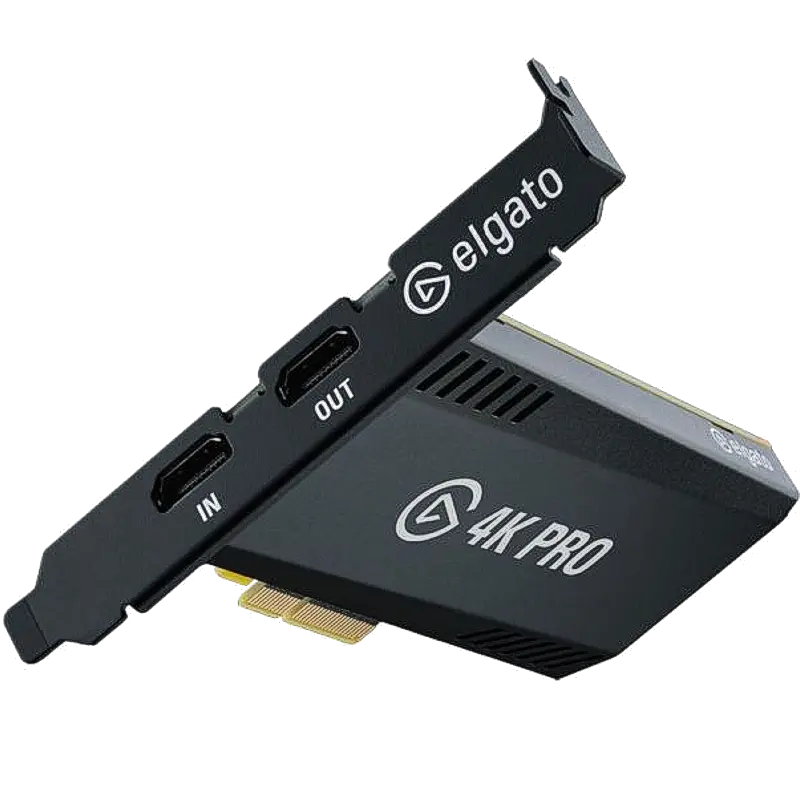
Elgato Game Capture 4K Pro
Internal PCIe capture card for dual-PC streaming setups. 4K60 10-bit HDR capture and 8K60 HDR10+ passthrough from one PCIe x4 slot.
- 4K60 10-bit HDR capture — record or stream at full 4K resolution at 60fps with 10-bit colour depth for maximum quality
- 8K60 HDR10+ passthrough — pass your 8K or 4K gaming signal through to your display at full speed without added latency
- VRR (Variable Refresh Rate) passthrough — G-Sync and FreeSync signals pass through unaltered so your monitor retains its refresh advantages
- Internal PCIe x4 card — sits inside your PC with no external cables or USB bandwidth constraints, freeing all USB ports
- NVENC, AMD VCE and Intel QuickSync encoding support — offload encoding to your GPU for maximum streaming performance
- Works with OBS Studio, Streamlabs, 4K Capture Utility and all major streaming software on Windows 10/11 64-bit
What is the Elgato Game Capture 4K Pro?
The Game Capture 4K Pro is Elgato's professional internal PCIe capture card, designed specifically for dual-PC streaming and recording setups. It installs into an available PCIe x4 slot in your streaming PC and captures the full 4K output of your gaming PC, PS5 or Xbox Series X at 60fps with 10-bit colour and HDR.
As an internal PCIe card, it avoids the bandwidth limitations of USB — the captured signal travels directly over the PCIe bus to your streaming software, with no compression penalties from USB 3.0 encoding. This makes it the preferred choice for content creators who demand the absolute highest quality capture from their setup.
8K passthrough
The HDMI 2.1 input handles signals up to 8K60 for passthrough to your display, meaning the card does not reduce or alter your gaming signal. Your display receives the full 8K or 4K signal exactly as output from your gaming source.
VRR and HDR in passthrough
Many capture devices strip VRR (Variable Refresh Rate) signals in passthrough, forcing you to choose between smooth gameplay and capture quality. The 4K Pro passes VRR through intact — G-Sync and FreeSync remain active on your gaming monitor while the streaming PC captures the feed simultaneously.
For dual-PC setups
The Game Capture 4K Pro is designed for dual-PC workflows where a dedicated streaming PC handles encoding and a separate gaming PC handles gameplay. The HDMI output of the gaming PC connects to the 4K Pro's input; the 4K Pro captures it for streaming software while simultaneously passing the full-quality signal through to the gaming monitor. This approach offloads all encoding from the gaming PC entirely.
| Video Input | |
| Input Connector | 1x HDMI 2.1 (Type A) |
| Max Capture Resolution | 3840x2160 at 60fps (4K60) — 10-bit HDR |
| Max Passthrough Resolution | 7680x4320 at 60fps (8K60) — HDR10+ |
| VRR Passthrough | Yes — G-Sync and FreeSync passthrough supported |
| HDR Capture | HDR10, HLG |
| HDR Passthrough | HDR10+, HDR10, HLG, Dolby Vision |
| Host Connection | |
| Interface | PCIe x4 (compatible with x4, x8 and x16 slots) |
| Form Factor | Internal PCIe card — half-height |
| Encoding | |
| GPU Encoding | NVENC (NVIDIA), AMD VCE, Intel QuickSync |
| Compatibility | |
| Operating Systems | Windows 10 64-bit (20H1 or later), Windows 11 64-bit |
| Software | 4K Capture Utility, OBS Studio, Streamlabs, Wirecast, vMix, Adobe Premiere Pro, DaVinci Resolve |
| Source Devices | PS5, Xbox Series X/S, Nintendo Switch, PC, camera HDMI output |
| Product Information | |
| SKU / Model | ELGATO-4KPRO |
| Warranty | 2-year Elgato warranty |
| Pricing | Price on Application — contact us for a quote |
Specifications correct at time of publication. Contact us to confirm before specification.
The Game Capture 4K Pro is aimed at content creators running dual-PC streaming and recording workflows who need 4K quality without USB bandwidth compromise.
Dual-PC Streaming
Capture the full 4K output of a dedicated gaming PC into OBS Studio or Streamlabs on a separate streaming PC. No encoding load on the gaming machine, maximum stream quality from the streaming machine.
4K Recording
Record 4K gameplay footage at 10-bit HDR for YouTube uploads, highlight reels and portfolio content. Significantly higher quality than USB capture at equivalent resolutions.
Console Capture
Capture PS5, Xbox Series X and Nintendo Switch at 4K60 — or pass 8K signals from compatible devices through to an 8K display while capturing at 4K for streaming.
Content Production
Use alongside Adobe Premiere Pro or DaVinci Resolve for post-production workflows that require high colour depth footage from gaming sources.
Multi-Platform Streaming
Feed captured footage simultaneously to YouTube, Twitch and TikTok via OBS or Streamlabs with multi-platform streaming enabled.
AV Integration
Integrate game feeds into professional AV installations, esports venues and gaming broadcast setups where internal PCIe is preferred over external USB devices.
Does the Game Capture 4K Pro work on macOS?
No — the 4K Pro is Windows-only (Windows 10 64-bit 20H1 or later, or Windows 11 64-bit). For Mac-compatible capture, see the Elgato Game Capture 4K X or 4K S, which both work on macOS via USB.
Which PCIe slot does the 4K Pro require?
The 4K Pro uses a PCIe x4 interface but is physically compatible with x4, x8 and x16 slots. As long as the slot runs at least x4 lanes electrically, it will work. Check your motherboard specifications to confirm lane availability.
Does it add latency to the passthrough signal?
Passthrough latency is negligible — effectively zero. The passthrough signal is not processed by the card; it simply routes through the HDMI circuitry to the output. Your gaming monitor receives the signal as if the card were not there.
Can I capture and stream at the same time?
Yes. The card captures the input for your streaming software while simultaneously passing the signal through to your gaming monitor. Both happen concurrently with no compromise to either.
What GPU is recommended for encoding?
An NVIDIA GPU with NVENC (GeForce GTX 10 series or newer), AMD GPU with VCE (RX 400 series or newer), or Intel CPU with QuickSync is recommended for hardware-accelerated encoding. A dedicated streaming GPU or a dual-GPU setup provides optimal performance.
Elgato capture devices are compatible with all major streaming and recording software via USB Video Class (UVC) — they appear as a standard webcam/capture source in any compatible application.
Streaming SoftwareContact us to confirm compatibility with a specific platform or version not listed above.