
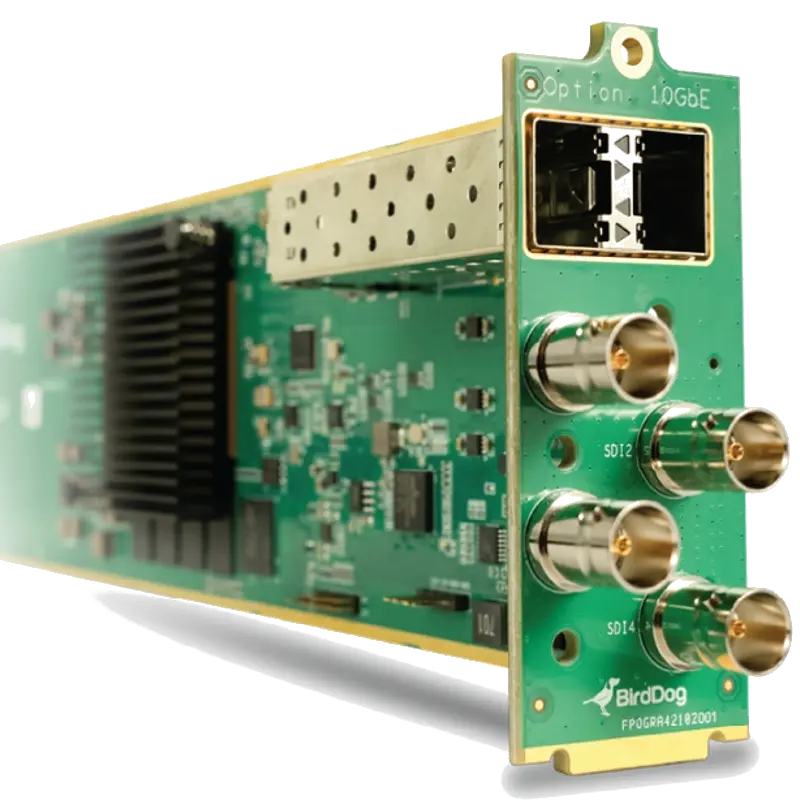
BirdDog OG4
The world's first NDI openGear card. Four independently configurable 12G-SDI channels in an openGear modular frame slot. Full NDI encode and decode with Dashboard control, SFP+, Crestron and Q-SYS.
- World's first NDI openGear card — brings Full NDI encode and decode capability into the openGear modular broadcast frame ecosystem for the first time
- Four independently configurable 12G-SDI channels — each port set as encode or decode independently, identical to the 4K QUAD but in an openGear card form factor
- Full openGear Dashboard control — manage the OG4 from the openGear Dashboard alongside all other cards in the frame, with the same control interface as the rest of the openGear infrastructure
- SFP+ for 10GbE connectivity — handles full bandwidth of four simultaneous Full NDI 4K streams over a single 10GbE connection from the openGear frame
- Crestron, Q-SYS and BirdDog API support — enterprise AV control integration in the openGear format
- For broadcast facilities already running openGear infrastructure — integrates NDI capability without adding separate chassis or hardware outside the existing modular frame
What is the BirdDog OG4?
The BirdDog OG4 is a card that installs into a Ross Video openGear oGx modular broadcast frame. openGear is a widely adopted standard in professional broadcast facilities for housing multiple processing cards — signal converters, audio processors, frame sync, colour correctors — in a common chassis with shared power, cooling and management via a central Dashboard interface.
The OG4 brings Full NDI encode and decode into this infrastructure. For a broadcast facility that already runs openGear frames, the OG4 adds four channels of bidirectional NDI I/O without any new chassis, rack units or external wiring beyond the frame's existing connections. It appears in the openGear Dashboard alongside all other cards in the frame.
Requires an openGear frame
The OG4 requires a Ross Video openGear oGx modular frame — it is a card, not a standalone device. The frame provides power, cooling and the Dashboard management connection. Contact us if you need to discuss frame options alongside the OG4 cards.
openGear Dashboard management
openGear frames connect to a central Dashboard server that provides a unified management interface for every card installed. The BirdDog OG4 appears in this Dashboard with its own control interface — configuring each port as encode or decode, managing NDI stream names and network settings — alongside all other openGear cards in the facility from a single browser-based management console.
NDI in existing broadcast infrastructure
The OG4 is the answer for broadcast facilities that want to adopt NDI workflows without rebuilding their infrastructure. The openGear frame stays. The existing cards stay. The OG4 slots in alongside them, connecting the facility's SDI router outputs and inputs to the NDI network without any external hardware additions.
| Form Factor | |
| Type | openGear card — requires openGear oGx modular frame |
| Compatibility | Ross Video openGear oGx frame |
| SDI Channels | |
| Number of Channels | 4 — each independently configurable |
| Per-Channel Mode | Encode (SDI to NDI) or Decode (NDI to SDI) |
| SDI Standard | 12G-SDI (SD/HD/3G/6G/12G auto-detect) |
| Max Resolution | 4K Ultra HD at 60fps per channel |
| NDI | |
| NDI Standard | Full NDI |
| Network | |
| SFP+ | 10GbE — via frame backplane or direct connection |
| Management and Integration | |
| Control | openGear Dashboard, BirdDog API |
| AV Control | Crestron, Q-SYS |
| Power | |
| Power | From openGear frame (no separate PSU) |
| Product Information | |
| SKU / Model | BD-OG4 |
| Warranty | 2-year BirdDog warranty |
| Pricing | Price on Application — contact us for a quote |
Specifications correct at time of publication. Contact us to confirm before specification.
The OG4 is for broadcast facilities with existing openGear infrastructure that want to add Full NDI I/O without additional hardware outside the modular frame.
openGear Broadcast Facilities
Add NDI capability to any broadcast facility already running openGear frames. The OG4 slots alongside existing openGear cards and appears in the Dashboard as one more managed card.
Master Control Rooms
Deploy multiple OG4 cards across openGear frames throughout a master control room for high-density NDI I/O at router output and input points.
Post-Production Facilities
Add NDI ingest and playout capability to openGear infrastructure in post-production facilities for NDI-based media movement between production suites.
Broadcast System Integration
The cleanest integration path for broadcast engineers deploying NDI in a facility that already standardised on openGear — no new chassis type in the rack.
Corporate Broadcast
Enterprise broadcast facilities using openGear infrastructure for signal processing extend their platform to NDI with the OG4 without new hardware categories.
University Broadcast Training
Broadcast training facilities using openGear for production infrastructure can add NDI to their curriculum without a separate NDI hardware layer.
Does the OG4 work without an openGear frame?
No. The OG4 is a card that requires a Ross Video openGear oGx frame for power, cooling and management. It cannot operate as a standalone device outside a compatible frame. Contact us to discuss openGear frame options if needed.
What is openGear?
openGear is a modular broadcast card standard from Ross Video. Multiple processing cards — signal converters, colour correctors, audio processors, sync generators and now NDI gateways — install in a common chassis (frame) that provides shared power, cooling and a central management interface called the openGear Dashboard.
All BirdDog devices output Full NDI — the highest quality NDI standard — making them immediately compatible with any NDI-capable production software on the local network.
NDI Production SoftwareBirdDog devices output Full NDI and are discovered automatically by all NDI-capable production software on the same Gigabit network subnet via mDNS. No manual IP configuration required.
Video Conferencing (via NDI plugin)Contact us to confirm compatibility with a specific platform or version not listed above.