
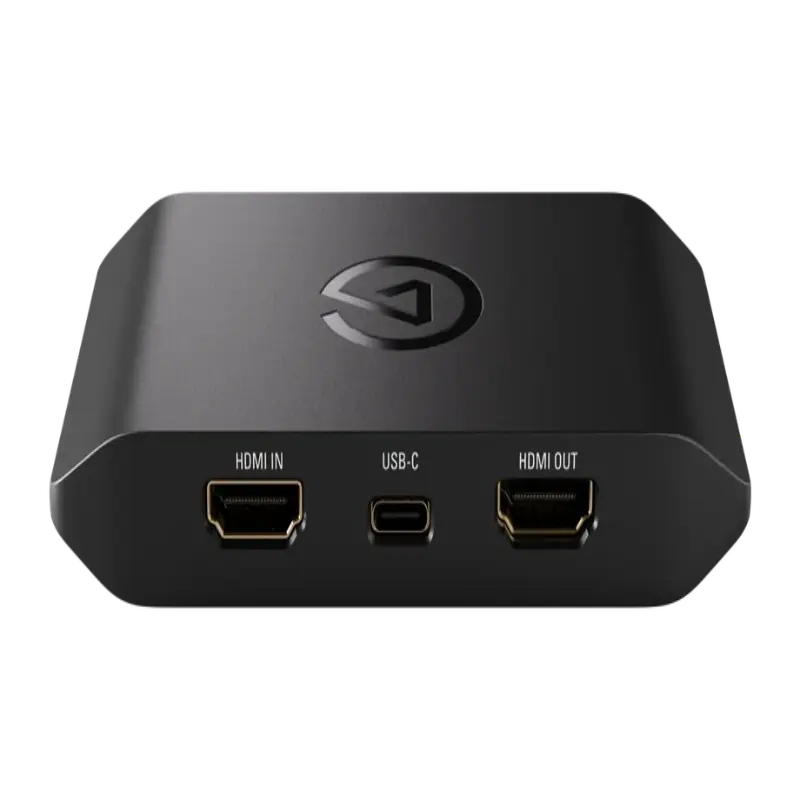
Elgato Game Capture 4K S
Compact USB-C external capture device. 4K60 HDR10 capture and passthrough, 1440p120 and 1080p240 modes. Works on Windows, Mac and iPad.
- 4K60 HDR10 capture — record and stream at 4K60 with full HDR10 colour, delivering the highest quality available from a compact USB-C capture device
- 1440p120 and 1080p240 capture modes — capture high frame rate footage for smooth slow-motion and competitive gaming content
- VRR passthrough — G-Sync and FreeSync pass through to your gaming monitor intact while capture is active on the same signal
- Compact USB-C form factor — the 4K S is noticeably smaller than most external capture devices, ideal for portable setups and travel
- Works on Mac and iPad (USB-C) — the only 4K60 HDR Elgato device with native macOS and iPadOS support, including Final Cut Pro on Mac
- Compatible with OBS Studio, Streamlabs, Adobe Premiere Pro, Final Cut Pro and all major streaming software
What is the Elgato Game Capture 4K S?
The Game Capture 4K S is Elgato's mid-range external 4K capture device, sitting between the entry-level Neo and the high-frame-rate 4K X. It captures at 4K60 with HDR10 and offers additional modes at 1440p120 and 1080p240 for high frame rate content creation — all via a compact USB-C connection.
It is the Elgato capture device with the broadest platform support: it works on Windows 10/11, macOS 11.6 and later, and iPadOS 16 and later. macOS compatibility makes it the recommended choice for creators working on a Mac — whether using Final Cut Pro, DaVinci Resolve or OBS Studio.
Compact design
The 4K S is notably compact compared to earlier Elgato capture devices and many competitors. For creators who travel with their setup or work in tight desk spaces, the physical footprint is a practical advantage.
HDR capture vs HDR passthrough
The 4K S captures in HDR10 — meaning the recording retains HDR colour information for post-production. Passthrough also supports VRR, HDR10 and Dolby Vision, so your gaming display retains full signal quality while capture is active. The distinction matters for creators who want their recordings to look as good as the gameplay itself rather than a downgraded SDR capture.
1440p and 1080p high frame rate modes
Beyond 4K60, the 4K S offers 1440p120 and 1080p240 capture modes. The 1440p120 mode is useful for competitive gaming content at high refresh rates. The 1080p240 mode enables slow-motion capture — recording at 240fps and playing back at 60fps delivers 4x slow motion with smooth motion detail.
| Video Input | |
| Input Connector | 1x HDMI 2.1 (Type A) |
| Max Capture (4K) | 3840x2160 at 60fps (4K60) HDR10 |
| High Frame Rate Modes | 1440p at 120fps, 1080p at 240fps |
| VRR Passthrough | G-Sync and FreeSync supported |
| HDR Passthrough | HDR10, Dolby Vision |
| Host Connection | |
| Interface | USB-C (USB 3.2) |
| Form Factor | Compact external |
| Compatibility | |
| Operating Systems | Windows 10/11 64-bit, macOS 11.6+, iPadOS 16+ |
| Software | 4K Capture Utility, OBS Studio, Streamlabs, vMix, Adobe Premiere Pro, DaVinci Resolve, Final Cut Pro |
| Product Information | |
| SKU / Model | ELGATO-4KS |
| Warranty | 2-year Elgato warranty |
| Pricing | Price on Application — contact us for a quote |
Specifications correct at time of publication. Contact us to confirm before specification.
The 4K S suits creators on both Windows and Mac who need 4K60 HDR capture with additional high frame rate modes in a compact, portable form factor.
Mac and Final Cut Pro
The 4K S is the recommended Elgato device for macOS users. It works natively with Final Cut Pro, DaVinci Resolve and OBS Studio on Mac, without requiring any workarounds or additional drivers.
iPad Streaming
Record or stream directly from an iPad Pro or iPad Air via USB-C — useful for on-location gaming content, studio setups where a tablet is the primary editing device, or mobile streaming rigs.
4K Console Capture
Capture PS5 and Xbox Series X gameplay at 4K60 HDR10 for YouTube and streaming, with the display receiving a full-quality HDR10 and VRR passthrough signal simultaneously.
Slow Motion Content
Record at 1080p240 for slow-motion segments — 4x slow motion at 60fps playback with smooth detail. Useful for FPS gameplay, sports game highlights and reaction content.
Portable Creator Setup
The compact form factor makes the 4K S the easiest high-quality capture device to carry. Combined with a laptop, it completes a fully portable 4K capture and streaming rig.
Multi-Platform Streaming
Stream simultaneously to YouTube, Twitch and TikTok at 4K60 via OBS Studio or Streamlabs with multi-platform output configured.
What is the difference between the 4K S and the 4K X?
The 4K X captures up to 4K144fps via HDMI 2.1. The 4K S captures up to 4K60fps. If you need 4K above 60fps, choose the 4K X. If 4K60 HDR is sufficient and you want a more compact device with Mac compatibility, the 4K S is the right choice. Both work on Windows, Mac and iPad.
Does the 4K S work with Final Cut Pro on Mac?
Yes. The 4K S is UVC compliant and works as a capture source in Final Cut Pro, DaVinci Resolve, OBS Studio and Elgato's own 4K Capture Utility on macOS 11.6 and later.
Can it capture at 1080p240 natively?
Yes — 1080p240 is a native capture mode on the 4K S, not a software interpolation. The full 240fps signal is captured and written to the recording file for genuine slow-motion in post-production.
Elgato capture devices are compatible with all major streaming and recording software via USB Video Class (UVC) — they appear as a standard webcam/capture source in any compatible application.
Streaming SoftwareContact us to confirm compatibility with a specific platform or version not listed above.