
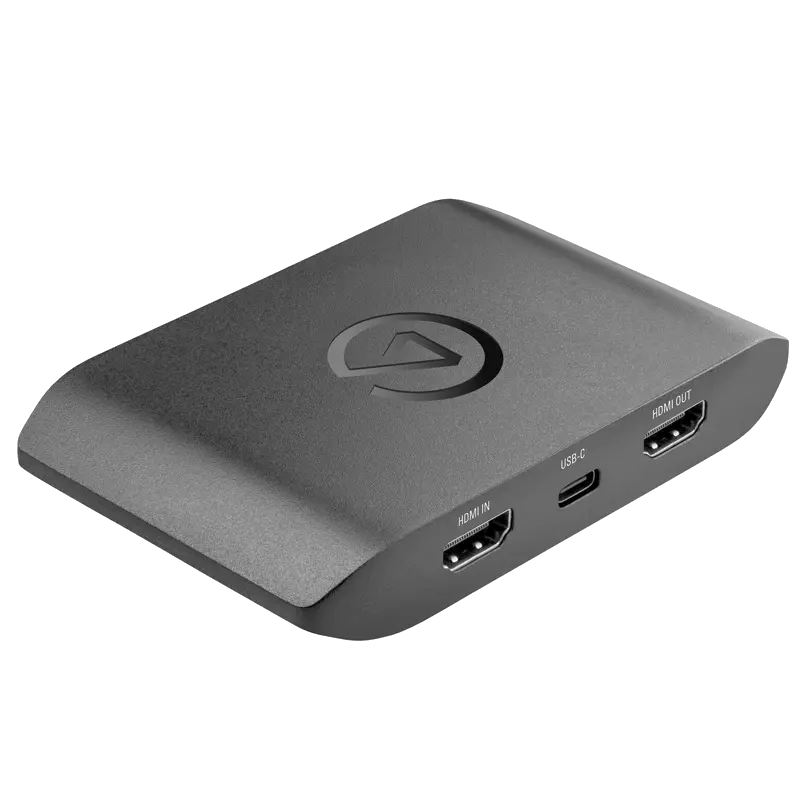
Elgato Game Capture 4K X
External USB 3.2 capture device capturing up to 4K144fps via HDMI 2.1, with VRR and HDR10 passthrough. Works on Windows, Mac and iPad.
- 4K144fps capture via HDMI 2.1 — the highest frame rate 4K capture available in an external USB device, ideal for high-refresh gaming content
- VRR passthrough — G-Sync and FreeSync signals pass through to your display intact so smooth gameplay is not compromised during capture
- HDR10 and Dolby Vision passthrough — full HDR quality reaches your display even while capturing SDR or HDR for streaming
- USB 3.2 Gen 2 interface — 10Gbps connection handles 4K high frame rate data throughput without compression artefacts
- External and portable — no PCIe slot required, works with any laptop or desktop via USB-C, including MacBook and iPad with USB-C
- Compatible with OBS Studio, Streamlabs, vMix, 4K Capture Utility and all major streaming platforms
What is the Elgato Game Capture 4K X?
The Game Capture 4K X is Elgato's flagship external USB capture device. Its HDMI 2.1 input and USB 3.2 Gen 2 connection together enable capture at resolutions and frame rates that were previously only achievable with internal PCIe cards — including 4K at 144fps, which is beyond the capability of older HDMI 2.0 capture devices.
As an external device, it requires no PCIe slot and works with any PC, Mac or iPad that has a USB-C port running at USB 3.2 Gen 2 speeds. This makes it the capture device of choice for laptop streamers, content creators who work across multiple machines, and anyone who cannot or does not want to open their PC for an internal card.
HDMI 2.1 and high frame rate
HDMI 2.1 is the key differentiator of the 4K X. Where HDMI 2.0 devices cap out at 4K60, the 4K X handles 4K120 and 4K144 — relevant for current-generation gaming on PC and Xbox Series X, where higher frame rates at 4K are increasingly common.
VRR passthrough in an external device
Most external capture devices cannot pass VRR signals through their HDMI circuit. The 4K X passes G-Sync and FreeSync through to the connected display, meaning a high-refresh monitor retains its VRR functionality while capture is active — a meaningful advantage for competitive gaming content creators.
Cross-platform compatibility
The 4K X works on Windows 10/11, macOS 11 and later, and iPadOS 16 and later — the iPad compatibility being particularly useful for creators who record directly to a tablet for on-the-go editing. All three platforms are supported via the same USB-C connection.
| Video Input | |
| Input Connector | 1x HDMI 2.1 (Type A) |
| Max Capture Resolution | 3840x2160 at 144fps (4K144) |
| Other Capture Modes | 1440p240, 1080p60 HDR10 and more |
| Max Passthrough | 4K144 VRR, HDR10, Dolby Vision passthrough |
| VRR Passthrough | G-Sync and FreeSync supported |
| Host Connection | |
| Interface | USB 3.2 Gen 2 (10Gbps) via USB-C |
| Form Factor | External desktop/portable |
| Compatibility | |
| Operating Systems | Windows 10/11 64-bit, macOS 11+, iPadOS 16+ |
| Software | 4K Capture Utility, OBS Studio, Streamlabs, vMix, Wirecast, Adobe Premiere Pro, DaVinci Resolve |
| Source Devices | PS5, Xbox Series X/S, Nintendo Switch, PC |
| Product Information | |
| SKU / Model | ELGATO-4KX |
| Warranty | 2-year Elgato warranty |
| Pricing | Price on Application — contact us for a quote |
Specifications correct at time of publication. Contact us to confirm before specification.
The 4K X suits creators who want high frame rate 4K capture from an external device that works across Windows, Mac and iPad without an internal PCIe card.
High Frame Rate Gaming
Capture 4K120 or 4K144 content from a gaming PC or Xbox Series X for YouTube uploads that showcase high frame rate gameplay at full 4K quality.
Laptop Streaming
Ideal for streaming on the go from a laptop — the USB-C connection works with any laptop that has a USB 3.2 Gen 2 port, including MacBook Pro and MacBook Air via Thunderbolt.
iPad Recording
Record gameplay footage directly to an iPad Pro or iPad Air via USB-C for instant editing in Final Cut or LumaFusion without transferring files between devices.
Console Capture
Capture PS5 and Xbox Series X at up to 4K60 for streaming or recording, with full HDR10 and Dolby Vision passthrough so your television display is not affected.
Multi-Platform Streaming
Stream simultaneously to YouTube, Twitch and TikTok at up to 4K60 using OBS Studio or Streamlabs with multi-platform output enabled.
Content Production
Record high frame rate footage for slow-motion segments or cinematic gaming montages at resolutions and frame rates not achievable with older HDMI 2.0 capture devices.
What is the difference between the 4K X and the 4K Pro?
The 4K Pro is an internal PCIe card (Windows only, desktop only). The 4K X is an external USB device (Windows, Mac and iPad). The 4K Pro captures at 4K60 10-bit; the 4K X captures at 4K144 via HDMI 2.1. If you have a desktop PC and need maximum colour depth, choose the 4K Pro. If you use a laptop, Mac or iPad, or need 4K above 60fps, choose the 4K X.
Does the 4K X capture at 4K144 or just passthrough?
The 4K X captures and records at up to 4K144fps natively — this is not just passthrough. Your streaming or recording software receives the full 4K144 feed for processing.
Does it work with a USB-A port via an adapter?
No. The 4K X requires USB 3.2 Gen 2 (10Gbps) bandwidth to handle 4K high frame rate data. USB-A to USB-C adapters typically connect via USB 3.0 (5Gbps) which is insufficient. A native USB-C 3.2 Gen 2 port or Thunderbolt port is required.
Can I use it with Nintendo Switch?
Yes. Nintendo Switch connects via HDMI from its dock to the 4K X input. Capture resolution is limited by the Switch output — the Switch outputs at 1080p60 maximum, so the 4K X will capture at 1080p60.
Elgato capture devices are compatible with all major streaming and recording software via USB Video Class (UVC) — they appear as a standard webcam/capture source in any compatible application.
Streaming SoftwareContact us to confirm compatibility with a specific platform or version not listed above.